Enrollment funnel events
Intro
Enrollment funnel events record steps in the enrollment journey that Light's other APIs do not log. Examples include when plans are shown to a customer or when they decline to continue. Light uses these events to measure funnel conversion and help you reduce customer drop-off.
Use these endpoints for steps Light's APIs do not already capture. Server-side API actions are already recorded by Light. For example, calling POST /v1/app/accounts/enroll/plans/request automatically logs a plan request. You do not need a separate event for that API call.
You can call these endpoints from your backend using your app token (authentication). Do not expose your app token in a browser. No account token is required because these events usually happen before an account is created in Light.
Both custom API integrations and prebuilt UI flows can send funnel events.
Prerequisites
- An app token for your sandbox or production app
- A custom enrollment flow where you control when plans are presented and when opt-out decisions are recorded (in a UI, server-rendered page, concierge tool, etc.)
Endpoints
All endpoints require your app token and return 401 without valid authentication.
Supported events
POST /v1/app/accounts/events records a funnel event. Pass one of these values in the event field:
event value | When to call |
|---|---|
plans_viewed | Plans are presented to the customer, not when you fetch or cache plan data |
enrollment_opt_out | The customer declines to continue enrollment (for example confirms an opt-out modal or tells a rep they are not switching) |
See Record plans_viewed and Showing an opt-out modal for request examples.
Routes
| Endpoint | Purpose |
|---|---|
GET /v1/app/accounts/enroll/opt-out/reasons | Fetch suggested opt-out survey options (used before showing an opt-out confirmation modal) |
POST /v1/app/accounts/events | Record a supported event (see table above) |
Identity tracking
Each event is attributed to a customer using one of these identity strategies:
| Strategy | When to use | Fields |
|---|---|---|
| Prospect | You know the customer's email before they have a Light account | prospect.email |
| Account | You have already created a Light account | account_uuid, or prospect.email that matches an existing account |
| Anonymous | You do not yet have identifying data for this customer | Omit prospect and account_uuid |
When you later create an account with POST /v1/app/accounts, pre-account events recorded with the same prospect.email are merged into the new account in analytics.
Record plans_viewed
Call this when plan cards or a plan comparison is presented to the customer, typically right after you render the response from POST /v1/app/accounts/enroll/plans/request. This can happen from your frontend after render, or from your backend when serving a server-rendered page.
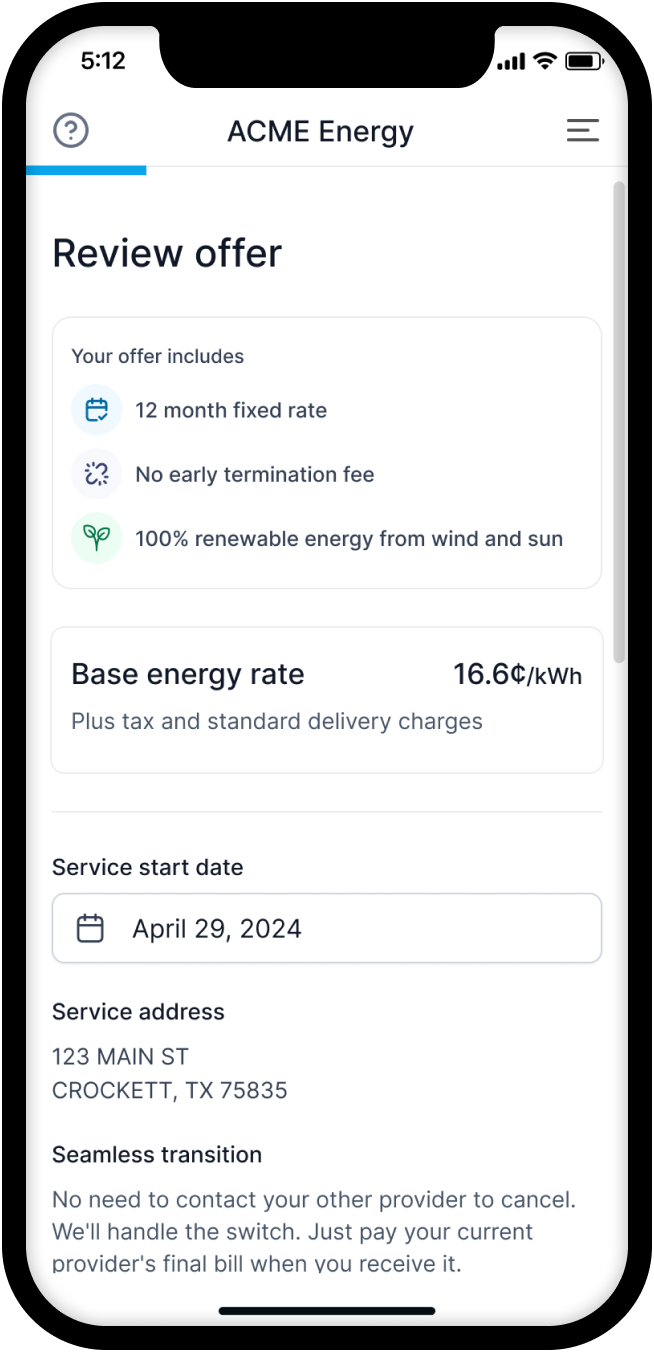
Fire plans_viewed when the customer can see a screen like the one above, not when plans are fetched or cached in the background.
Identified prospect
curl -X POST "https://api.light.dev/v1/app/accounts/events" \
  -H "Authorization: Bearer $APP_TOKEN" \
  -H "Content-Type: application/json" \
  -d '{
    "event": "plans_viewed",
    "prospect": { "email": "jane.smith@example.com" },
    "plan_uuids": ["a14b20c3-809a-483f-68dc-3d35911eec04", "b25c31d4-910b-594e-79ed-4e46022ffdd5"]
  }'
Anonymous visitor
Use when you do not yet have identifying data for the customer:
curl -X POST "https://api.light.dev/v1/app/accounts/events" \
  -H "Authorization: Bearer $APP_TOKEN" \
  -H "Content-Type: application/json" \
  -d '{
    "event": "plans_viewed",
    "plan_uuids": ["a14b20c3-809a-483f-68dc-3d35911eec04"]
  }'
Existing account
{
  "event": "plans_viewed",
  "account_uuid": "c36d42e5-021c-6a5f-8afe-5f57133ggee5",
  "plan_uuids": ["a14b20c3-809a-483f-68dc-3d35911eec04"]
}
Calling plans/request does not record a plans_viewed event. Fire plans_viewed only when the customer actually sees the plans, not when plans are fetched or cached in the background.
Showing an opt-out modal
In many enrollment flows, customers see a plan or set of plan options with a way to skip the step or opt out of switching. That primary action should open a follow-up modal rather than silently dropping the customer.
Use a confirmation modal to understand why they are not interested. Light provides suggested reason codes and labels via GET /v1/app/accounts/enroll/opt-out/reasons.
Recommended flow
- Show plans: Fire
plans_viewedwhen the customer can see the options. - Customer opts out: Open your confirmation modal; do not fire
enrollment_opt_outyet. - Fetch reasons: Load survey options from
GET /accounts/enroll/opt-out/reasons. - Customer confirms: Fire
enrollment_opt_outwith the selectedreasonandlabelwhen needed. - Dismiss without a reason: You may still fire
enrollment_opt_outwithoutreasonorlabel.
Record enrollment_opt_out when the customer confirms they are opting out, not when they first tap skip on the plan screen.
Record the opt-out
If the customer viewed plans before opting out, include the same plan_uuids:
curl -X POST "https://api.light.dev/v1/app/accounts/events" \
  -H "Authorization: Bearer $APP_TOKEN" \
  -H "Content-Type: application/json" \
  -d '{
    "event": "enrollment_opt_out",
    "prospect": { "email": "jane.smith@example.com" },
    "plan_uuids": ["a14b20c3-809a-483f-68dc-3d35911eec04"],
    "reason": "no_real_savings",
    "label": "I don'\''t see real savings"
  }'
reason and label are optional.
Request fields
See the POST /v1/app/accounts/events API reference for the full request schema.
The request body is a discriminated union on event: shared fields apply to both event types, and reason / label are only valid for enrollment_opt_out. Event-specific fields are rejected on the wrong event type (for example reason is not valid on plans_viewed).
For opt-out reason codes, fetch options from GET /v1/app/accounts/enroll/opt-out/reasons, use other, or send a partner-defined code with a matching label.
async function onPlansRendered(plans, { email }) {
  const body = {
    event: "plans_viewed",
    plan_uuids: plans.map((plan) => plan.uuid),
  };

  if (email) {
    body.prospect = { email };
  }

  await fetch("https://api.light.dev/v1/app/accounts/events", {
    method: "POST",
    headers: {
      Authorization: `Bearer ${appToken}`,
      "Content-Type": "application/json",
    },
    body: JSON.stringify(body),
  });
}
Response
All successful event submissions return 201:
{
  "recorded": true
}
Events are processed asynchronously. A 201 response means the event was accepted for recording, not that it has already appeared in analytics dashboards.
What Light records automatically
You do not need funnel events for these server-side actions:
| Action | Recorded by |
|---|---|
| Plan request | POST /v1/app/accounts/enroll/plans/request |
| Plan acceptance | POST /v1/account/enroll/plans/accept |
| Account creation | POST /v1/app/accounts (including prospect identity merge) |
| Enrollment finalization | POST /v1/account/enroll/finalize |
Use funnel events for steps Light's APIs do not record on their own: seeing plans and choosing not to enroll.
Related guides
- Basic enrollment: Full enrollment API flow
- Authentication: App tokens vs account tokens
- Webhooks: Server-side enrollment lifecycle notifications