Prebuilt UI
Light offers several ways to integrate customer experiences, from fully custom UIs built on our API to prebuilt interfaces you can launch with minimal code. All prebuilt options use the same public APIs you can call directly, so you can start with a prebuilt experience and migrate to a custom integration over time.
Choosing an integration approach
Pick the approach that matches where the customer completes the experience and how much UI you want to own. You can combine Embedded Flow, Light-Hosted Flow, and Light-Hosted Application in the same integration. All prebuilt options share a default look and feel and can be minimally configured with your logo and company name to match your brand.
| Approach | What the customer sees | Recommended when |
|---|---|---|
| Embedded Flow | A branded, singular flow that appears as a modal within your app via iframe or webview | Customers should stay in your product while enrolling, paying bills, or completing other flows |
| Light-Hosted Flow | A branded, singular flow on a standalone page opened from email, SMS, or another out-of-band link | You need a scoped interaction outside your app, such as enrollment, billing, renewals, or battery connection |
| Light-Hosted Application | A full, branded customer dashboard experience using your website domain | You want a complete account portal that includes all flows without building one |
| Custom API integration | Your UI, powered by Light endpoints | You need full control over layout, navigation, and business logic |
Embedded Flow
Embedded Flow is a low-code option where you embed a scoped Light experience inside your website or mobile app as an iframe or webview. Customers never leave your product, but you skip building the flow UI yourself.
Recommended when:
- You want customers to complete enrollment, billing, documents, or other flows without leaving your app
- You need to ship a complete experience quickly inside an existing product
- You can surface the flow at the right moment (for example, after a button click or route change)
Use POST /v1/app/accounts/{account_uuid}/flow-login with "behavior": "embedded". See the Embedded Flow tutorial below.
Both Embedded Flow and Light-Hosted Flow use the same scope values. Scope of the session should be one of:
"enrollment"— enrollment flow"update-payment-method"— update payment method"documents"— account documents"billing"— invoices and billing"renewal"— renewal flow for an active service location"connect-battery"— battery connection flow
Light-Hosted Flow
Light-Hosted Flow is a branded, singular flow on a standalone page hosted by Light for discrete transactional interactions. Customers typically open it from a pre-authenticated link sent by email or SMS.
Recommended when:
- The interaction happens outside your app, for example a renewal reminder email or a battery-connection campaign
- You want a focused, single-purpose flow without using Embedded Flow in your product
- You need to ship regulatory or lifecycle flows (like renewals) with minimal implementation
Use POST /v1/app/accounts/{account_uuid}/flow-login with "behavior": "hosted". See the renewal guide for a common use case.
Hosted links expire 14 days after you generate them. That window suits out-of-band flows, such as a renewal link a customer opens days after you email it.
- Node.js
- Python
- cURL
const response = await fetch(
  `https://api.light.dev/v1/app/accounts/${accountUuid}/flow-login`,
  {
    method: "POST",
    headers: {
      Authorization: `Bearer ${process.env.LIGHT_APP_TOKEN}`,
      "Content-Type": "application/json",
    },
    body: JSON.stringify({
      scope: "renewal",
      behavior: "hosted",
    }),
  },
);

const flowData = await response.json();
console.log("Light-Hosted Flow URL:", flowData.login_link);
import requests
import os

response = requests.post(
    f'https://api.light.dev/v1/app/accounts/{account_uuid}/flow-login',
    headers={
        'Authorization': f'Bearer {os.getenv("LIGHT_APP_TOKEN")}',
        'Content-Type': 'application/json'
    },
    json={
        'scope': 'renewal',
        'behavior': 'hosted',
    }
)

flow_data = response.json()
print(f"Light-Hosted Flow URL: {flow_data['login_link']}")
curl -X POST "https://api.light.dev/v1/app/accounts/ACCOUNT_UUID/flow-login" \
  -H "Authorization: Bearer $LIGHT_APP_TOKEN" \
  -H "Content-Type: application/json" \
  -d '{
    "scope": "renewal",
    "behavior": "hosted"
  }'
Light-Hosted Application
Light-Hosted Application is your white-labeled customer web app—a single portal on a Light-Hosted subdomain or your own custom domain that brings together enrollment, billing, documents, service details, energy usage, and the rest of your account flows. Embedded Flow and Light-Hosted Flow each deliver one scoped experience; the hosted application is the full account app customers return to over time.
Light-Hosted Application must be set up for your organization before you can use it or generate login links. Reach out to get started. You can use the default Light-Hosted subdomain or configure a custom domain so customers see your own URL.
Recommended when:
- You want a complete post-enrollment portal without building and maintaining your own app
- Customers should manage their account on a standalone site (for example, linked from your marketing site or emails)
- You are fine with Light's portal layout and navigation patterns
Use POST /v1/app/accounts/{account_uuid}/app-login with a route to control where the customer lands after login (for example "billing"). Links expire 14 days after they are generated.
- Node.js
- Python
- cURL
const response = await fetch(
  `https://api.light.dev/v1/app/accounts/${accountUuid}/app-login`,
  {
    method: "POST",
    headers: {
      Authorization: `Bearer ${process.env.LIGHT_APP_TOKEN}`,
      "Content-Type": "application/json",
    },
    body: JSON.stringify({
      route: "billing",
    }),
  },
);

const appData = await response.json();
console.log("Portal URL:", appData.login_link);
import requests
import os

response = requests.post(
    f'https://api.light.dev/v1/app/accounts/{account_uuid}/app-login',
    headers={
        'Authorization': f'Bearer {os.getenv("LIGHT_APP_TOKEN")}',
        'Content-Type': 'application/json'
    },
    json={
        'route': 'billing',
    }
)

app_data = response.json()
print(f"Portal URL: {app_data['login_link']}")
curl -X POST "https://api.light.dev/v1/app/accounts/ACCOUNT_UUID/app-login" \
  -H "Authorization: Bearer $LIGHT_APP_TOKEN" \
  -H "Content-Type: application/json" \
  -d '{
    "route": "billing"
  }'
Tutorial
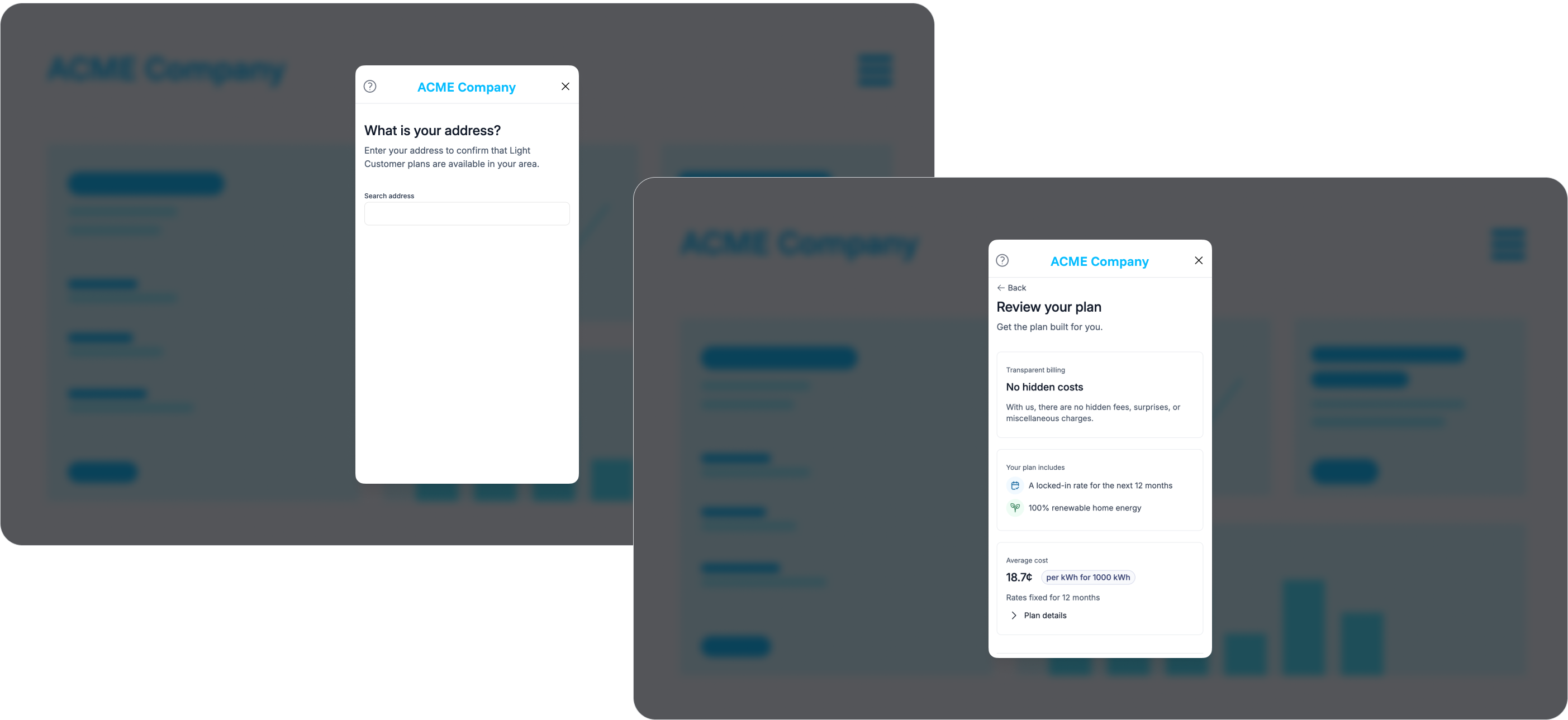
1. Get an Embedded Flow link
When you launch Embedded Flow, you'll launch it for a specific Account. Use the uuid of the Account as the account_uuid in a POST to /v1/app/accounts/{account_uuid}/flow-login?scope=enrollment with "behavior": "embedded":
- Node.js
- Python
- cURL
// Get the Embedded Flow URL for enrollment
const response = await fetch(
  `https://api.light.dev/v1/app/accounts/${accountUuid}/flow-login`,
  {
    method: "POST",
    headers: {
      Authorization: `Bearer ${process.env.LIGHT_APP_TOKEN}`,
      "Content-Type": "application/json",
    },
    body: JSON.stringify({
      scope: "enrollment",
    }),
  },
);

const flowData = await response.json();
console.log("Flow URL:", flowData.login_link);
import requests
import os

# Get the Embedded Flow URL for enrollment
response = requests.post(
    f'https://api.light.dev/v1/app/accounts/{account_uuid}/flow-login',
    headers={
        'Authorization': f'Bearer {os.getenv("LIGHT_APP_TOKEN")}',
        'Content-Type': 'application/json'
    },
    json={
        'scope': 'enrollment'
    }
)

flow_data = response.json()
print(f"Flow URL: {flow_data['login_link']}")
# Get the Embedded Flow URL for enrollment
curl -X POST "https://api.light.dev/v1/app/accounts/ACCOUNT_UUID/flow-login" \
  -H "Authorization: Bearer $LIGHT_APP_TOKEN" \
  -H "Content-Type: application/json" \
  -d '{
    "scope": "enrollment"
  }'
{
  "login_link": "https://flow.light.dev/login?token=6277d9fb7b76832d1fc7545d4ed649d7",
  "scope": "enrollment",
  "behavior": "embedded",
  "expires_at": "2025-09-30T14:30:00.753Z"
}
The login_link returned will be a pre-authenticated flow link that can be used to launch an iframe or webview. The expires_at indicates when the pre-authenticated token included in the login_link will expire.
An embedded link expires 20 minutes after you generate it, and it works only once. Generate the link at the moment you're ready to show the flow rather than caching it, and generate a fresh one if the customer needs to reopen the flow. Light-Hosted Flow links last longer, as described in Light-Hosted Flow above.
2. Surface Embedded Flow at the right moment
Embedded Flow is usually displayed inside an iframe or webview after a user clicks a button or navigates to another page.
For end users to successfully navigate Embedded Flow, no other UI elements should visually appear on top of the iframe or webview. Ensure other UI elements, such as nav bars, have a lower z-index and are not absolute-positioned on top.
- HTML
- React
<iframe
  src="https://flow.light.dev/login?token=6277d9fb7b76832d1fc7545d4ed649d7"
  width="100%"
  height="100%"
  style="position: fixed; top: 0; left: 0; z-index: 99999;"
  title="Light Flow"
  allow="payment"
></iframe>
import React from "react";

interface FlowIframeProps {
  url: string;
}

const FlowIframe: React.FC<FlowIframeProps> = ({ url }) => {
  return (
    <iframe
      src={url}
      width="100%"
      height="100%"
      style={{
        position: "fixed",
        top: 0,
        left: 0,
        zIndex: 99999,
      }}
      title="Light Flow"
      allow="payment"
    />
  );
};

export default FlowIframe;
3. Close the flow
You'll need to close Embedded Flow once a user chooses to exit the flow. Close Embedded Flow by listening for the light-flow-close event emitted by the flow.
- HTML
- React
<!doctype html>
<html>
  <head>
    <title>Light Enrollment Flow</title>
    <style>
      .flow-container {
        position: fixed;
        top: 0;
        left: 0;
        right: 0;
        bottom: 0;
        z-index: 9999;
      }

      .flow-iframe {
        width: 100%;
        height: 100%;
        border: none;
      }
    </style>
  </head>
  <body>
    <div id="flow-container" class="flow-container" style="display: none;">
      <iframe id="flow-iframe" class="flow-iframe" title="Light Flow" allow="payment"></iframe>
    </div>

    <script>
      function showFlow(url) {
        const container = document.getElementById("flow-container");
        const iframe = document.getElementById("flow-iframe");

        iframe.src = url;
        container.style.display = "block";

        // Listen for the close event
        window.addEventListener("message", handleMessage);
      }

      function hideFlow() {
        const container = document.getElementById("flow-container");
        container.style.display = "none";

        // Remove the event listener
        window.removeEventListener("message", handleMessage);
      }

      function handleMessage(event) {
        const eventType = event.data?.type;
        if (!eventType) {
          return;
        }
        if (eventType === "light-flow-close") {
          hideFlow();
        }
      }
    </script>
  </body>
</html>
import React, { useEffect } from "react";

interface FlowIframeProps {
  url: string;
  onClose: () => void;
}

const FlowIframe: React.FC<FlowIframeProps> = ({ url, onClose }) => {
  useEffect(() => {
    const handleMessage = (event: MessageEvent) => {
      const eventType = event.data?.type;
      if (!eventType) {
        return;
      }

      if (eventType === "light-flow-close") {
        onClose();
      }
    };

    window.addEventListener("message", handleMessage);

    return () => {
      window.removeEventListener("message", handleMessage);
    };
  }, [onClose]);

  return (
    <iframe
      src={url}
      width="100%"
      height="100%"
      style={{
        position: "fixed",
        top: 0,
        left: 0,
        zIndex: 99999,
      }}
      title="Light Flow"
      allow="payment"
    />
  );
};

export default FlowIframe;
The enrollment flow
Embedded Flow and Light-Hosted Flow run the same enrollment experience when you use the enrollment scope.
The flow opens by asking the customer for their zip code, so we can confirm the address is in a retail choice area and identify their utility. It then presents the offer, and collects the full service address after the customer accepts it.
Skipping steps with data you already have
Anything you set on the account before launching the flow is one less thing the customer has to enter:
preliminary_addressis used as a suggestion when the customer searches for their address. If it matches an address on file with the utility, the flow skips the address search step and lets the customer correct it if needed.preliminary_addresswith apostal_code, plusbroker_terms_agreedset totrue, takes the customer straight to the offer. Both are required. See skip ahead to the offer in the enrollment guide.- First name, last name, and email are shown as read-only in the flow when you provide them. The customer can't edit them, so make sure the values you send are correct.
service_start_datepre-selects the service start date, so the customer only has to confirm it.
Apple Pay and Google Pay
Customers can save a payment method using Apple Pay or Google Pay during enrollment. These wallet buttons appear alongside card entry, which is always available. When a wallet can't load, the flow falls back to card entry on its own.
Express pay is available to every partner, but it requires some setup.
Register your domains
Share every domain where the flow appears with your Light contact, so we can register it with Stripe. Wallet buttons only appear on registered domains. Include each environment you run, such as your staging and production domains.
Allow payments in the iframe
An embedded iframe needs the allow attribute with the payment permission, or the browser blocks the wallet from loading:
<iframe
  src="https://flow.light.dev/login?token=6277d9fb7b76832d1fc7545d4ed649d7"
  width="100%"
  height="100%"
  title="Light Flow"
  allow="payment"
></iframe>
Load the flow over HTTPS in mobile apps
A mobile app must load the flow in a webview as a secure HTTPS page. Google Pay works in most Android webviews. Apple blocks Apple Pay in iOS webviews that don't run in a secure context, which includes frameworks that load your app from local files, such as Ionic.
What customers see
Which buttons appear depends on the customer's device and browser. Apple Pay usually appears in Safari on Apple devices, and Google Pay usually appears in Chrome. A customer also needs the wallet set up with at least one payment method. If neither wallet is available, the customer enters a card instead.
Custom API integration
Build every screen yourself using Light's App API and Account API. You control the full user experience, including enrollment steps, billing dashboards, document viewers, and renewal flows, while Light handles electricity service, billing, and compliance behind the scenes.
Recommended when:
- You already have a customer dashboard or mobile app and want Light to feel native to your product
- You need custom business logic, branching, or design that Embedded Flow, Light-Hosted Application, and Light-Hosted Flow cannot support
- You are optimizing a mature funnel and want full ownership of analytics and UX
Tradeoff: Custom API integration requires the most frontend and integration work. See the enrollment, billing, and renewal guides for API walkthroughs.